
El Sevilla FC tiene claro que si Marko Dmitrović sale del club irán a por el ex portero de la SD Huesca, Álvaro.
El Sevilla tantea a Álvaro Fernández
García Pimienta, el nuevo técnico de la entidad no cuenta con Dmitrović, el portero serbio termina contrato con la entidad en 2025 y dos clubes recién ascendidos a la Liga EA Sport están bastante interesados en ficharle.
El Real Valladolid y el CD Leganés se han fijado en el guardameta, pero su alto salario estaría dificultando su salida de la capital andaluza.
Aunque el Sevilla también cuenta en la portería con Alberto Flores, prefieren apostar por un seguro bajo los palos como Álvaro.
El de Arnedo compartiría portería con Nyland. En el Sevilla se han fijado en él porque cuenta con una gran experiencia en la liga española, puesto que es canterano de Osasuna, ha jugado en el Mónaco B, en el Extremadura, en el Huesca, al que volvió después de una experiencia en Inglaterra en el Brentford y una cesión en España en el RCD Espanyol.
En esta última etapa ha estado defendiendo la portería Oscense durante tres temporadas tras su regreso a la entidad después de su paso por el conjunto perico.
Ha conseguido mantener esta temporada su portería imbatida en 19 ocasiones, siendo uno de los porteros que más veces ha dejado sus porterías a cero esta temporada en la Liga Hypermotion, ha sido el tercer portero del ranking menos goleado de la categoría.
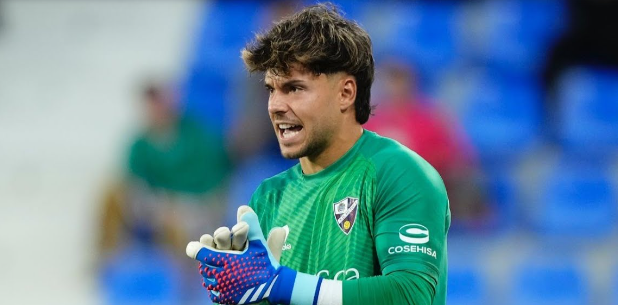
El Sevilla se está reconstruyendo y uno de sus objetivos es volver a hacer su portería competitiva, ya que es una de las metas de la actual junta directiva.
Autor: Manuel Álvarez Lozano
Sigan toda la información y actualidad deportiva en Twitter: @agentelibre_dig, y en Instagram: @agentelibre_dig

You can report offensive content or broken video links through the app’s support email. https://hedgedoc.timon.ch/s/HsSdQ5qgq The fast-forward and rewind buttons skip exactly ten seconds of video.
InShot has an app to make videos for Instagram right on your Android or Apple device. The app is intuitive and allows you to set the frame size to match Instagram’s best sizing options. You’ll enjoy basic features, such as splitting, trimming, and cutting your videos. Along with the vanilla video editing tools, the Edits app offers a green screen feature to help you easily replace and edit backgrounds. You also get a few AI-powered tools that you can use to create animated clips using static images or isolate specific people or objects in a video with precision tracking to give the video a more dynamic look. If you’re still keen to develop your craft, there are many resources you can turn to for help taking your TikTok videos and Instagram Reels to the next level. You can even check out the latest insights on the Plann blog.
https://comicvine.gamespot.com/profile/marisolfuentes/
I do not tend to white reviews but this app mede me! I’m a college student and recently i’ve had a lot of assignments that involve audio and video editing. This is an application that has helped me a lot, it is perfect! Magic clips Editing like GDoc Captions for videos It is getting better and better.Happy to be a customer. Vizmato is a delightful free app for shooting and editing video. It features a streamlined interface that lets you record HD video with live special effects. The latest version includes a slideshow maker that lets you create movies from photos and or videos with several built-in themes like Basic, Happy, Romance, Party and Holiday. The app’s video themes — HipHop, Vintage, Chaplin, Sci-Fi and 8MM — join special effects like Beats, Trail, Mirror, Fluidic and more to make your videos shine. Themes offer a combination of visual filter with embedded music to create an exciting, fun experience. But you can choose each effect and your own music as well.
Comprehensive editing tools. From basic trimming to advanced features like keyframe animations, InShot has a tool for every editing need, making it a versatile video editor app. Movavi’s basic editing features include multi-track editing, transitions, syncing audio and video, split screen. More advanced features are motion tracking, color correction, chroma key, video stabilization, etc. In a word, it is a perfect video editor to handle anything from basic edits to complex video projects. CapCut provides an auto video reframe feature that can smartly analyze video footage and automatically adjust the framing to optimize it for different aspect ratios. This feature is particularly useful for those who need to repurpose their videos for different platforms such as social media, websites, or presentations. With this feature, you can be confident that your content will look polished and professional across various devices and screen sizes.
https://lit.link/en/danielthomas
Are you looking to invest in video editing apps? Mobile video production and editing is now an $8 billion industry. This could be due to the app’s limitations, availability issues, or preference for specific advanced tools. This post evaluates top apps like CapCut across both the paid and free space while highlighting their unique features and use cases. Both online and mobile-based editing apps are covered. SCALE VIDEO ACROSS TEAMS And I’m no professional video editor, either — so, you don’t have to worry about major learning curves or any software certifications. Each one of the platforms below is intuitive, easy, and (often) free for most features. Read on to see which will be best for your videos. Although CapCup is available for multiple platforms, including desktop, mobile, and web browser, most users access it from mobile for editing short-form video content. InShot is a mobile and desktop video editing tool available for Android, iOS, and Huawei’s Harmony OS for mobile, and it has Mac and Windows desktop options. Its mobile version is similar to CapCut — InShot is also Chinese-owned, like CapCut’s ByteDance developer.
Some basic effects and filters are free, but many are available only via in-app purchases. Collage templates let you load and play several videos in one screen, but you must render the collage before you can add effects. All output can be shared to Instagram, Facebook, YouTube and Messenger. The app is available for free, but removing the watermark costs $1.99. Extra video and sound effects, fonts, stickers and filters range in price from 99 cents to $4.99. Video is a valuable form of content for social media. Unfortunately, creating quality videos is usually a long process that involves moving mobile footage to a desktop app for editing. However, mobile editing is on the rise. Apps such as Splice Video Editor make it possible to efficiently create high-quality video content for social media.
https://6a6340efb7e24.site123.me/
One of the major reasons why the slot is so popular is that its bonus round gets triggered quite frequently. No official stat is provided, but this becomes obvious quite quickly. 1-2 scatters show up in almost every other game. Bigger Bass Bonanza demo is always available to test the theory. The Bigger Bass Bonanza RTP rate is 96.71%. This is a lot higher than the 96% slot game average and at the top when compared to other Big Bass series slots (more info on the series below). Pragmatic Play has also produced 95.67% and 94.62% RTP versions which will more than likely be used at the majority of slot websites. Check your RTP by opening the game’s Paytable. Big Bass Bonanza video slot is teeming with big rewards. The game includes many exciting features to help you catch big bass. These include the following:
Kdenlive in Berlin The best video editor Mojo stands out compared to other apps, thanks to its very complete offer in terms of personalization. You can find many features and effects. Indeed, with its 300 different text templates and styles, the possibilities are endless. Moreover, it is very easy to get started and produce very high-quality videos. The animation of images and texts offers a truly professional rendering, without any technical difficulty. Besides, Mojo is also a photo editing app and a photo background changer. If you’re looking for quality, you won’t be able to find a 100% free video editor app for Android that checks all your boxes. Naturally, you begin to wonder, «Can I get away with a free app with in-app purchases without actually making a purchase». And the answer is – it depends!
https://www.growkudos.com/profile/danie_lsoto
where we provide professional wedding video editing services and transform your ideas into compelling video content. Our team of skilled editors and motion graphics experts is dedicated to delivering high-quality videos that resonate with your audience and elevate your brand. Regarding editing wedding videos, this software can be a game-changer as it is the most advanced and popular tool preferred by most video creators today. It has many unique features, including Artificial Intelligence that can identify faces and edit them quite efficiently in a wedding video. Get your clients amazed with that cinematic appeal in their wedding videos without moving a muscle yourself – that is the beauty of wedding video editing outsourcing. Our wedding video editing experts specialize in chopping, arranging, and creating perfect transitions between shots to turn them into captivating pieces of art. To top it all off, we color-grade the footage to achieve that ‘wow’ factor.
Updated 13 October 2025 at 14:12 IST Finally, the expense of developing a video editing app equivalent to GoPro Quik can range from $200,000 to $600,000 or more, depending on criteria like as the app’s complexity, design, functionality, and the location and competence of the development team. The accompanying cost breakdown provides an estimate of the total cost involved in producing an app similar to GoPro Quik. — Camera Compatibility — Floating Tube Play Video Music: Watch Tube Videos in Floating Mode Another benefit of playing in the GoPro universe is the opportunity to use GoPro’s QuikStories app to quickly generate edited videos of your vacation highlights using just a smartphone. Are you in search of a video editor that meets all your visual needs? Read this article to learn everything about Lightworks video editor and its alternative.
https://www.coh2.org/user/176816/emmascreat
Up until the release of Big Bass Bonanza, Sweet Bonanza was one of Pragmatic Play’s most popular slot games. However, that soon all changed, as the friendly fisherman captured players’ hearts. The game features a fairly simple bonus feature, and maybe this is what is appealing to players. Olaf collects fish for big wins and progresses on a bonus trail for bigger win multipliers. As soon as Pragmatic realized that they had a winning formula, they started milking it for all its worth. You can try the Big Bass Bonanza demos in our free demo slot section. Everybody knows that fishing is a sport that is all about patience, with long periods where nothing much happens suddenly broken by a frenzy of activity. And the Big Bass Bonanza slot is very similar. The base game spins away, with the occasional line win. But when three or more of the leaping bass Scatters appear on the screen, the Free Spins kick in, and the action heats up.
Remove backgrounds, erase objects & upscale effortlessly. Google Photos is a user-friendly media storage app that offers a few features to manage your snapshots and create basic animations. With Google Photos, individuals can easily create simple animations on their desktops and mobile devices. Adobe Express, previously known as Adobe Spark, has plenty of animation tools. They are pleasantly simple to use, as CC Express is one of the best photo editing software for beginners. You can leverage this power of animation to make a design that stands out among the rest. Select from photo animation options, including zoom, pan, blur, or fade, to highlight your photo in a captivating way. If you find yourself short on ideas, explore the Adobe Express template library, loaded with thousands of professionally designed examples to kickstart your creativity. Choose a template, remix it with your own photos and personal touch, and publish it in minutes.
https://zumpadpro.zum.de/s/r1iBk2bKfl
Everyone loves to dress up at Halloween so join Moose Fabio and real kids for costume faves and a spooktacular dance party to Bones! Bones! Bones! Upload tracks, auto-generate beat-synced videos. Customize mood, scenes for artists brands. Whether you want movement for fun, theatrical previews, or simply to make people smile, the animation captures your energy and personality. From subtle chest bounces to playful, exaggerated movements, you choose the style and vibe. Your custom jiggle video is guaranteed to make you stand out from the crowd. Despite these potential hurdles, StoryZ Photo Motion’s high-quality animations and detailed adjustment capabilities make it a top choice for photo animation. Pixelup: AI Photo Enhancer App A Night in the Woods in October SelfyzAI is the easiest-to-use AI video generator and face app that transforms your photos and selfies into stunning anime, portrait, manga, and 3D-cartoon styles without watermarks. With just one click, unleash your creativity and explore a universe of characters.
We used Asana as our project management software for 7-8 years before switching to Motion. That said, if Motion were to disappear tomorrow, we’d go back to using Asana which is why we’re rating Asana the best Motion alternative for project management. A dynamic video-sharing platform for everyone Having Alight Motion installed on a PC means working on your projects anytime, anywhere, without being restricted by the limitations of a mobile device. You can easily switch between PC and other devices, syncing your work effortlessly across platforms. Alight Motion is a free video editing tool for mobile devices. It makes the editing process for videos easy, despite the chaotic home screen. The application… Alight Motion is one of the most popular video and animation editing applications. This app mainly comes in versions for Android and iOS. The app does not have a PC version, but with the help of an Android emulator, one can use it on a computer running Windows or Mac.
https://notes.stuve.fau.de/s/ZbWszzwRz_
Importing assets is flexible, even bulk zips, and there is a library of fonts and stickers if nothing is on hand. Text templates are editable down to spacing and color. Projects can hop between phone and desktop with cloud storage, which is handy if editing on a laptop later. There is even a protection mode for drafts with passwords and expiration, and exports can be set to 4K at up to 60 fps. No watermark, which matters a lot when posting. Repurpose long videos into platform-ready shorts for TikTok, Instagram, and YouTube. Starting from scratch? Generate complete videos from text prompts using our AI video generator. Plus, collaborate with your team in real-time and access your projects from any browser—no software download required. Start editing for free and create professional content in minutes.
One of the standout features of InShot is its Picture-in-Picture (PiP) capability, which enables users to add a secondary video over the main video. This is ideal for reaction videos, gameplay highlights, and tutorial overlays. InShot Video Editor features essential editing functions, including trimming, cutting, splitting, merging, and cropping videos. These tools let you remove unwanted sections, join clips, or adjust frames. It also supports precise frame-by-frame editing, perfect for cleaner cuts. However, it does not have a dedicated tool to compress videos. Inshot Mod APK gives you all the features and tools for free. You can edit videos without ads and watermarks and share videos in HD. You can edit videos and photos as you want. Download from here and start creating today. InShot allows you to modify your images and videos’ orientation easily. You can rotate, flip, zoom in or out, and adjust the angle to your liking. Moreover, the app provides additional video features, such as the ability to freeze or reverse specific sections, which can help you achieve the desired effect in your editing process.
https://docs.monadical.com/s/YFbnCmwOsx
Automatically remove silent sections to streamline your video content. Flixier is a free text to speech video maker app that allows you to create videos easily and collaboratively. It is a cloud-powered video editing product that can be accessed through any computer browser, making the video creation process faster and more efficient. In this initial release, AI narration is available in video storyboards in the desktop app. Launch ScreenPal and open an existing storyboard or create a new storyboard. Add your recordings and videos, type in your script or import a script from a document. Audio files are securely stored in your browser’s local storage for privacy and quick access. They remain available until you clear your browser data or manually delete them. For permanent storage, we recommend downloading your audio files to your device.
As one of the best video editing software, AVS Video Editor has received quite a lot of reviews. We have collected some representative AVS Video Editor reviews, hope you can get a better understanding of AVS Video Editor. Well the classic way of having one person talked about something from the beginning of the video to the end is kinda boring now. So with the use of these video editing softwares, demonstrations have become more interesting to watch. The effects especially for video teasers would sure catch the attention of the viewers. Watch it here Once you have imported your videos, you can start editing them using the numerous editing tools available. Trim, cut, and merge clips to create a seamless flow, add transitions to enhance the visual appeal, and apply various video effects to add a unique touch to your videos.
https://markdown.iv.cs.uni-bonn.de/s/v5H17c6bp
You can link parameters of various layers – directly or through mathematical expressions. This allows you to create advanced character puppets and other dynamic structures. So now that you know about the best tools to make animated photos, hopefully, you will be able to make the right choice. I have included a huge list of photo animator software for PCs and apps that one can choose to animate static images online. You can even upload a photo of an outfit you spotted offline, and AI will find similar pieces or suggest how to style them. No more endless scrolling or disappointing try-ons only to return the product later. This animation video app features over 100 effects, smooth keyframe animation, and a wide range of visual tools—making it one of the best animation apps for creators on the go. While it may feel overwhelming at first, the app offers tutorials to help users master transitions and develop high-quality animated content with a professional look.